Everything is a key away.
A command palette on Ctrl K, j and k in every list, and shortcuts you can change in the settings.
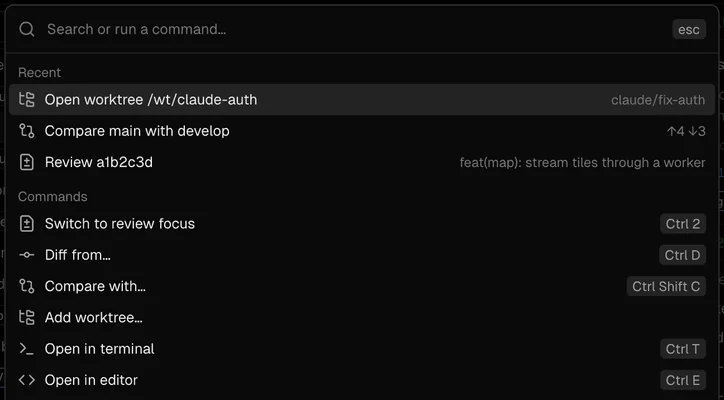
Begitra is the Git client for reviewing the code your agents write. Mark what you have read, see what changed since, preview every merge, and keep every worktree in view.
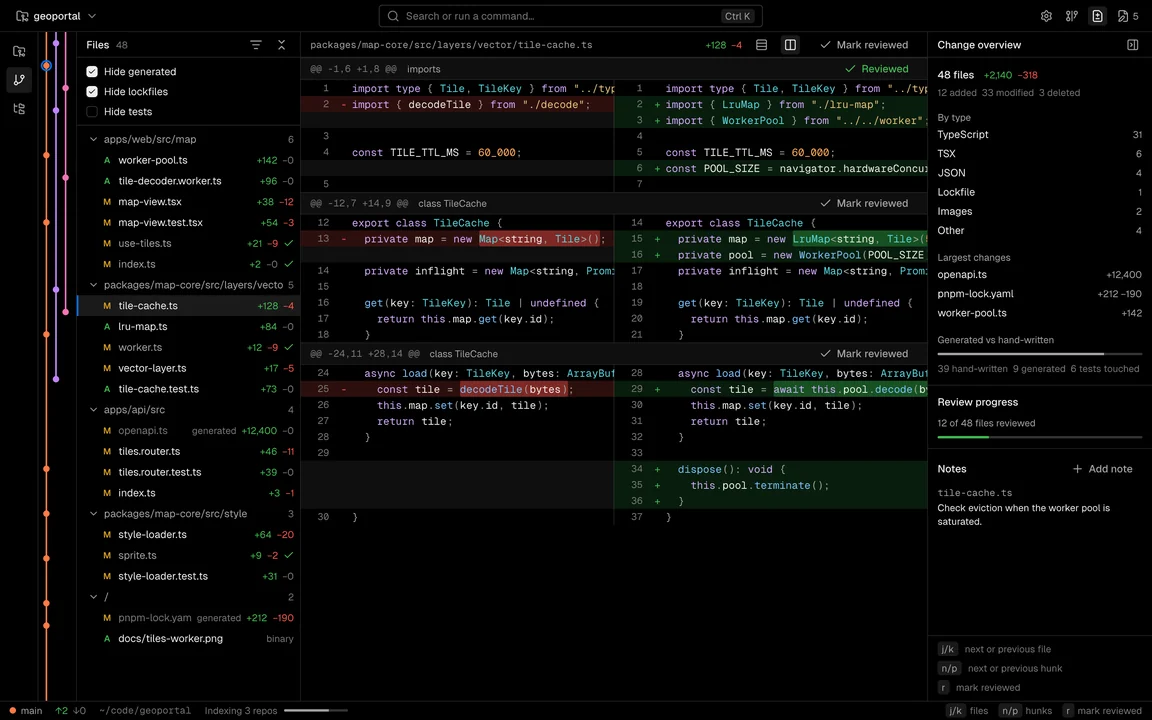
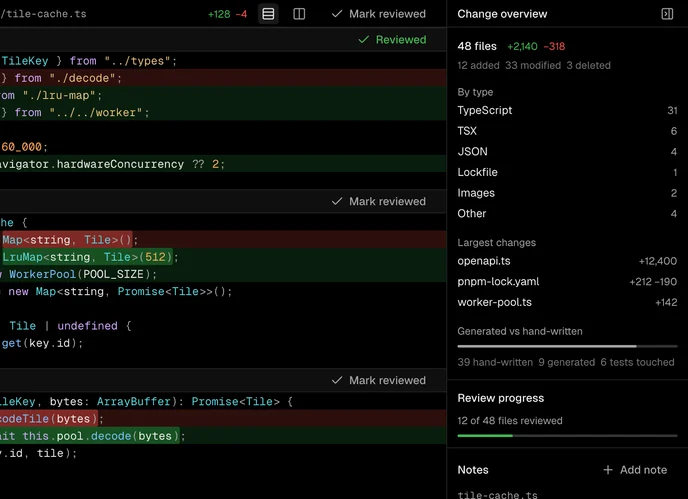
Review mode
A mark holds while the code is the same. When an agent rewrites a line you already read, Begitra asks for your eyes again.
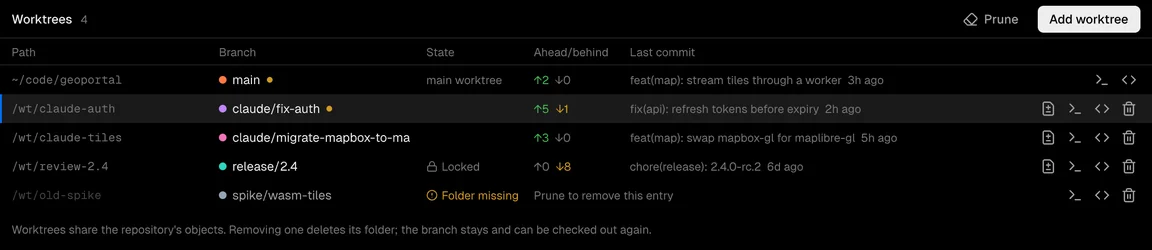
Worktrees
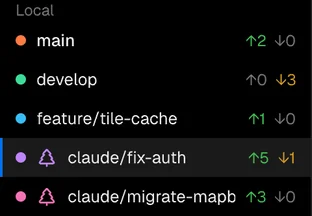
Each worktree with its branch, its uncommitted changes, how far it is ahead of or behind main and its last commit, current while your agents work. Add, remove, prune and lock worktrees, and open any of them against main in one step.
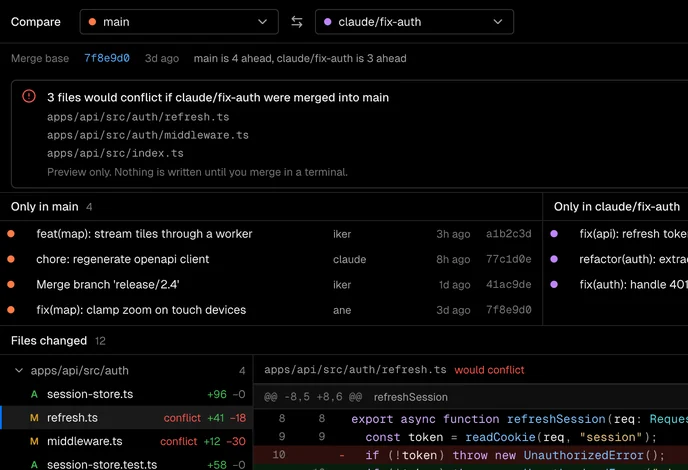
Compare and merge preview
Pick two branches, tags or commits. Begitra shows their merge base, the commits only on each side and the combined diff, and tells you whether the merge would fast-forward, merge cleanly or conflict, and in which files. Your working tree stays untouched.
Built for large repositories
1.48 million commits and 96,000 files. Begitra reads history, diffs and comparisons page by page, so the first screen is there before you look for it.
Medians of Begitra's engine benchmarks on a laptop with an AMD Ryzen AI 9 HX 370 and a warm disk cache.
Everyday Git
A command palette on Ctrl K, j and k in every list, and shortcuts you can change in the settings.
New in 0.3
Open a folder that holds several repositories: see the staged and unstaged changes of each one together, stage and commit each from one place, and follow their changes live.
~/code/geoportal4 repositories
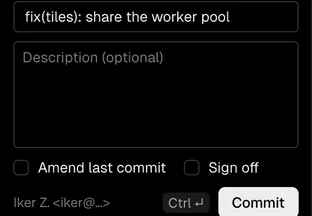
Stage and discard files, hunks or single lines, then commit from one box that shows who you commit as.
Switch, create, rename and delete branches; merge, rebase, cherry-pick and revert; fetch, pull and push with their progress.
No account and no telemetry. Marks, notes and settings stay on your computer.
When Begitra goes online
What's new
Begitra checks for a new version when you ask it to, in Settings › About, and verifies its signature before installing.
0.12.0
The sidebar is a rail of icons on every screen while a project is open, and none on Home: an icon opens its section as a panel that floats over the screen, which keeps its width, and Escape or a click outside closes it. Comparisons open in tabs of their own beside the project's view: going to the graph and back keeps them, Ctrl+Tab and Ctrl+Shift+Tab move between tabs, Ctrl+W closes one, and each project remembers its tabs. In the graph, the scope's “Branches matching…” takes a pattern such as claude/* and walks the branches it matches, local and remote, counting them as you type; a button hides the remote branches no local branch tracks, and the setting stays across launches; Go to HEAD (h on the rows, or its button) selects HEAD's commit and centres it, loading the history it needs; a branch and its upstream on the same commit share one badge; a double click on a branch's badge checks it out, and a Ctrl-click on a row compares it with the selected commit in a new tab. Repositories with thousands of tracked branches list them much faster.
0.11.0
The top bar shows Fetch, Pull and Push for the repository the graph shows, Pull and Push with how many commits they would bring or send. Fetch fetches every remote and says when it last did; Pull only moves the branch forward, and a branch that diverged from its upstream opens the pull dialog instead of being merged or rebased behind your back; Push sends the branch to its upstream, or publishes a branch that has none. A button that cannot act says why in its tooltip, and a branch whose upstream was deleted on the remote is never pushed back in one click. Ctrl+Shift+F fetches and Ctrl+Shift+L pulls; Ctrl+Shift+P still opens the push dialog, since it is VS Code's command palette key. The commit box no longer has "Push after commit": a commit never pushes by itself, and once the branch has commits to push the box shows Push (or Publish) beside Commit; Ctrl+Shift+Enter still commits and pushes in one step.
0.10.0
Clean up branches (the brush in the Branches header, or the palette) lists the local branches merged into main or gone from their remote, squash and rebase merges included, each with why, and deletes the ones you tick with their worktrees in one confirmation; its toast keeps the commands that bring each branch back. A gone branch with changes main lacks, or one the check could not answer in time, is listed unticked with a warning, and a branch an agent moved since the listing stays. Since 0.6.5 the sidebar is one column of foldable sections (Repositories, Branches, Remote branches, Tags, Worktrees) under one filter; Undo commit on the graph's HEAD row and in the palette moves HEAD back, with Redo; the commit box can push after the commit, and Ctrl+Shift+Enter commits and pushes once; a conflicted file can be taken whole from one side, with Undo; Ctrl+F finds in the changes under review; File history in a file's menus shows the graph filtered by it; a branch's menu adds a worktree for it or opens the one that holds it, and removing a worktree can delete its branch too. File rows show an icon of the file's kind and the name before its folder, many text controls became icons named by their tooltips, and a dialog opened from a menu keeps the keyboard's focus.

Free for Windows 10 and 11, 64-bit. Needs Git 2.38 or later.
Yes. No account, no trial, no telemetry.
The installers are not code-signed yet, so Windows may show “Windows protected your PC”: choose More info, then Run anyway. The download page lists each installer's SHA-256 and signature, so you can check that the file is the one published there.
Begitra reads Git. Whatever writes to your repositories and worktrees, Claude Code, Codex, Cursor or you, shows up in it.
Yours. Begitra runs the Git installed on your computer, 2.38 or later, so your hooks, credentials and configuration apply, and when Git refuses, you read Git's own words.
Begitra builds on both, but those builds are not published yet.